

An app says your messages are encrypted. Can the company still read them? Follow a private draft from sender to recipient to understand the difference—and where your own precautions still matter.
You’ve written an announcement that isn’t ready to go public. Before sharing it with a colleague, you check the messaging app. It says “encrypted.” Good—but encrypted from whom?
You might be worried about someone watching the network. You might also want to keep the draft private from the company delivering it. Those aren’t quite the same problem.
Encryption scrambles readable information into ciphertext. The right key lets software turn it back into something you can read. The important part is knowing who has that key and where the message becomes readable again.
Let’s follow your draft
Transport encryption: protecting the journey to the server
Transport Layer Security, or TLS, protects a connection between devices and services. When you visit an HTTPS website, you’re using this kind of protection.
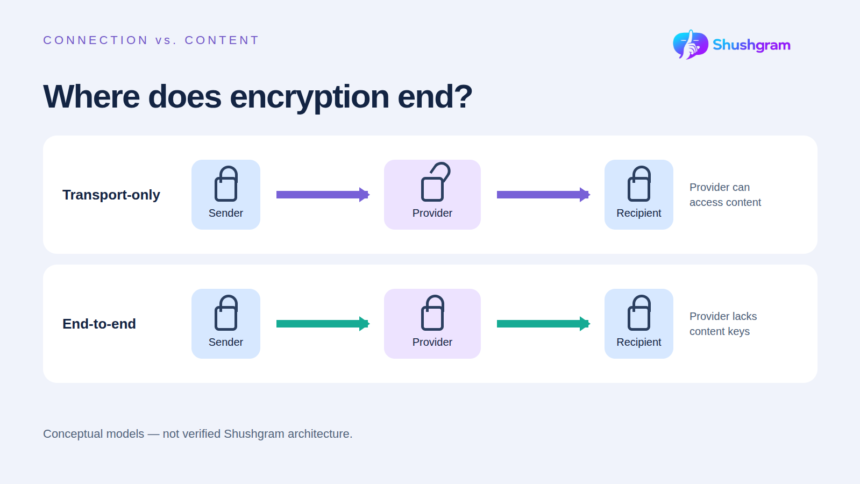
In a transport-only messaging setup, your draft travels through an encrypted connection to the provider’s server. The server can read it, then forward it to your colleague over another encrypted connection.
Think of two protected delivery routes with a sorting office in between. Someone watching a route can’t simply read the parcel’s contents. But the sorting office can open it.
TLS is useful protection against network eavesdropping and tampering. It just doesn’t, by itself, keep the content secret from the server handling that connection. That’s why a browser’s secure-connection indicator isn’t proof of end-to-end encrypted messaging.
End-to-end encryption: keeping the content locked along the way
With correctly implemented end-to-end encryption, your device encrypts the draft for your colleague’s authorised devices. The service delivers it without having the keys needed to read the message. Your colleague’s device unlocks it.
In the parcel example, the sorting office now passes along a locked package it can’t open. That changes who you need to trust with the contents.
E2EE and TLS aren’t competing options. A service can use both: one protects the message across the delivery service, while the other protects the connection. These are simplified models, rather than a diagram of any particular app.
Three differences to keep in mind
Who can read it? With transport-only messaging, the provider can read content at its server. Correctly implemented E2EE keeps the decryption keys from that delivery provider. Either way, the recipient can read and copy the message.
What happens along the route? Transport encryption protects the connection. E2EE also keeps content encrypted through the delivery service. Neither description tells you how backups or exported copies are protected.
What remains visible? Neither approach hides everything about a conversation. Connection times and other metadata may remain available. Check the service’s privacy and storage rules alongside its encryption description.
When you’re choosing a secure messaging app, check which features the description covers. Private chats, groups, attachments, calls and linked devices may not all work the same way. A broad “encrypted” label doesn’t settle those details.
Now change one thing about the conversation
Your colleague photographs the screen
The draft arrived safely, but your colleague can now read it. They can also photograph the display with another device. Encryption can’t make someone forget what they’ve seen, and disappearing messages don’t remove this possibility. Recipient trust still matters.
Someone gets into an unlocked device
A person using your unlocked phone—or malware running on it—may see the draft before encryption or after decryption. Keep software updated, use a strong screen lock and consider hiding notification previews. Device encryption helps protect stored information, but it answers a different question from message encryption.
Someone takes over the account
A stolen account may let someone impersonate you or access available conversations. It doesn’t necessarily give them the keys to every old E2EE message: that depends on the app’s recovery and device-linking design. Use a unique password, protect your recovery email and enable extra authentication where available.
The draft enters a backup
If your service or device backs up conversations, ask who can decrypt that copy. “Encrypted backup” doesn’t necessarily mean the provider lacks its keys. Read the backup rules separately from the chat settings, including what happens when you delete a message.
Look beyond the message itself
There’s another distinction worth making before you compare product descriptions: keeping a message private doesn’t necessarily hide the fact that a conversation happened.
The envelope can reveal something too
Think about an ordinary letter. The page inside and the delivery details on the envelope tell different stories. Messaging has a similar distinction between content and metadata, although the exact information available depends on the system.
A service may be unable to read your draft yet still handle connection times or IP addresses. That doesn’t make content encryption useless. It means you should ask a separate question about the information surrounding the message. Read the privacy policy for the categories collected and their retention rules instead of treating E2EE as a promise of complete anonymity.
What would useful technical documentation explain?
You don’t need to understand every equation in a protocol specification. Look first for answers you can use: is encryption on by default, which conversations does it cover, and how does the service add a new device? If participants can compare verification codes or keys, the documentation should explain what that check establishes.
Recovery deserves a careful look too. If you lose your phone, can a replacement restore old conversations? If so, what authorises that restoration and who can unlock the stored copy? Different designs make different trade-offs between recoverability and access to keys.
An independent security review can add useful evidence, but read its scope and date. A review of one app version or feature isn’t automatically assurance about every later change. Clear documentation should help you connect a security claim with the way you’ll actually use the service.
How this relates to Shushgram
Shushgram’s website puts privacy-first messaging at the centre of its offer: email-based registration without a required phone number, private communities and temporary conversations. Those choices address identity and conversation history alongside the separate question of encryption.
The homepage states that Shushgram uses E2EE and generates keys locally. This article reports that description; it isn’t an independent verification of the underlying implementation. Shushgram’s explainer helps readers evaluating a secure messaging app understand transport protection, E2EE and their limits.
If you’re considering the private messaging app for sensitive conversations, ask which features are covered and how keys, new devices and recovery are handled. You can request current technical details through Shushgram’s contact page. Those answers are more useful than guessing from a slogan.
Before you send that draft
Come back to the original question: who should be able to read it? If the delivery provider must not have access, look for documented E2EE covering the feature you’ll use. Then consider the recipient’s device, your own account and any backup copies.
You don’t need to become a cryptographer to make a better choice. Know where the encryption ends, ask about anything unclear, and share with someone you trust.